Loading..
Sponsored By :GoogleAdsense.
Showing posts with label blogging. Show all posts

Tuesday, November 29, 2011

Adsense Alternatives When Google Bans Your Account

Google recently disabled the Adsense account of John Q. Public for generating invalid or fraudulent clicks.
It has come to our attention that invalid clicks have been generated on the Google ads on your site(s). We have therefore disabled your Google AdSense account. Please understand that this step was taken in an effort to protect the interest of the AdWords advertisers. [from adsense-adclicks@google.com]
His subsequent appeals to Adsense Support were also turned down.

John Q. Public is now looking for alternate revenue streams to monetize his blog and sends us the following questions:

Q 1: Can I get back my Adsense Account ?

There are few cases when previously banned Adsense publishers managed to reinstate their Google account successfully with Google only deducting some amount related to invalid clicks.
Thank you for clarifying your situation. We have reviewed your circumstances and have reinstated your account, effective immediately. Based on the findings of our investigation, we have deducted $30.82 from your account. [from adsense-adclicks-appeal@google.com]
While it is not a bad idea to follow your case with Google, not everyone may be so lucky as Stas or Jason. Generally, the chances of resurrecting your Adsense account are less.

Q 2: If the answer is No, then what's best alternate for adsense.

While Adsense still rules in terms of Ad inventory, there are tons of other advertising programs that can you consider for your blog depending on your niche and demographics. Here are some popular alternatives:

Adsense Alternatives» Yahoo YPN - If you are located in the US, this is probably the best alternative to Adsense. Yahoo Panama is launching on February 5th.

» FeedBurner Ads - Feedburner is probably performing quite very well for a lot of publishers. The ads are CPM in nature and they have decent reporting engine.

» Text Link Ads, Adbrite - You can sell text links on your blog pages using any of these programs. They also let you add advertising in your RSS feeds.

» Kontera, IntelliTXT - These are inline contextual advertising programs that double-underline the keywords. Some users may however find this annyoying since the ad appears in a pop-up window.

» Chitika, Amazon Affiliates - If you are writing a product blog, Chitika may result in good conversion rates - people read the product review on your website and then proceed to these sites for buying the links. Amazon is good for blog that enjoy a fan following and readers buy what you recommend.

Other popular advertising options include Tribal Fusion, Adify, Pheedo and BlogAds depending on your site traffic. [Picture from Flickr]

Q 3: Does Google block the account or the website itself ? Actually I was planning to sell my blog so can the new owner use his own Adsense Account to insert ads in my blog ?

Google generally bans the Adsense account, not the website showing the Google ads. It is however recommended that the "prospective buyer" checks this with Google Adsense Support himself before closing the deal with you. It is very likely that Google will permit him to show ads on your site using his own Adsense account.

Important: Just take care that you don't open another Adsense account with Google using different credentials (like an abbreviated name or a different address) - Google is very likely to discover this activity and they'll will probably ban you again. [Name changed to protect identity]

Monday, August 1, 2011

Creating A Random Blogroll Widget In Blogger

I was talking with Sarah a while back about Better Blogroll and she asked whether I knew of a similar widget for Blogspot users that would show a random subset of links from a Blogspot blogroll. Today, I finally spent a little time putting something together that would work within Blogspot’s unique framework. While I didn’t come up with anything that has as many options as Better Blogroll, I did manage to come up with a hack that will allow Blogger users to display a random subset of links from the Blogger Links Widget.

This is a hack, so you’re going to have to get a little dirty to make it work. In the end, you’ll have a random blogroll, but the widget will ignore the “number of items to show” and “sort” options in the widget because those will be controlled from within the new code.

If you’re interested in creating a random links list on your own Blogger/Blogspot blog, read on for the complete instructions.

How To Show Random Links On Your Blogspot Blog
  • Go to the Layout Tab and click Add Page Element.
  • Find Links List and click Add To Blog.
  • Type in a title and click Save Changes.
  • Go to the top of the Layout page and click Edit HTML
  • Click Download Full Template, so that if you mess this up, you’ll have a backup of your template.
  • Put a check in the checkbox that reads Expand Widget Templates.
  • Search for the line in the template that contains the title you input. It should look something like this:


  • This is the start of the widget you created. Don’t touch this line, but delete all the lines below it until you reach . This is the end of the link list widget. Now you have an empty links widget. Your code should look something like this:


<--NEW CODE WILL GO HERE-->


  • What you’ve done is gutted the Links widget, and now you’re going to fill the space with the new random blogroll guts. Take the following code and insert it into the section above that reads “NEW CODE WILL GO HERE”. Please don’t make me tell you that “<--NEW CODE WILL GO HERE-->” should NOT be in your code. You knew that already.


  • Well, Dr. Frankenblogger, you’re almost there. The widget defaults to 10 random links. If you want to change that, change the number on this line: var maxlinks = 10; to the number of links that you’d prefer.
  • Click Save Template.
  • Click on the Layout Tab.
  • Click Edit on the Links Widget and add some links to your blogroll. *dyers

Sunday, July 31, 2011

Socializing your feed with Twitter

Sometimes you reach across the hedgerow to share with your nearby neighbors. Other times, members of the household move away and yet you can't keep from calling to remind them to wear a hat and such because it's chilly out. Today, we're celebrating acquaintances near-and-far by launching the ability to send your feed to Twitter.


FeedBurner has always been about measuring, managing, and monetizing syndicated content. Our hope is that by providing one application in which you can direct your feed in real-time to a number of endpoints, in this case Twitter in addition to the myriad feed readers, aggregators, and search engines that we have always supported, and then following on with providing analytics for measuring exactly how and where your feed gets distributed across social media, you can make better and more informed decisions about how to monetize your content.


Many of our publishers who have tried our Google Analytics feed item link integration have already noticed that their most popular feed items have been shared many times on Twitter.


We're now taking our distribution and analytics a step further by enabling the ability to automatically publish the feed items that meet your criteria to Twitter, using the Google URL shortener at goo.gl.

To get started, go to the Socialize service on FeedBurner's Publicize tab and add the Twitter account to which you would like to post items from your feed. You can take the default settings and click [Save] to start socializing immediately, or use the options we offer to customize exactly which feed items are sent to Twitter and how exactly you would like them to look. The next time you post a new item to your feed it will be sent to Twitter (as always, make sure to ping FeedBurner whenever you update your feed so this process happens as near real-time as possible).

For full details on all Socialize options, see our FeedBurner Help Center topic.


To see the results, take a look at the Twitter account in which you are sending your updates. This blog post, for instance, as well as select blog posts from this and the FeedBurner status blog, will appear from now on at http://twitter.com/feedburner. If Twitter is where you are consuming most of the latest content these days, please follow @feedburner to receive our updates in your favorite Twitter client. source

Your stats, right away

Do you hate delays? Do you think being told to “Please wait…” by websites, cash machines, call centers, and the doughnut stand drive-thru guy in the year 2010 is a sure sign modern living isn’t quite meeting our collective expectations as a planet?


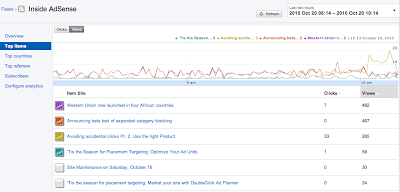
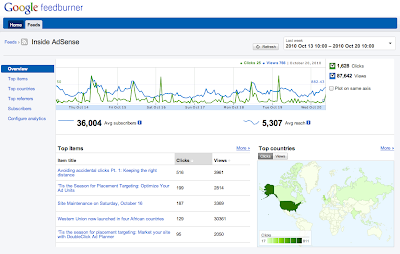
Good news! Today, we will be rolling out a new, experimental interface for Google FeedBurner. The real story is what’s new under the hood, however: the new interface provides real time stats for clicks, views, and podcast downloads, which means you can start seeing what content is drawing traffic from feed readers, Twitter, and other syndicated sources as it happens.


Additionally, if you use the FeedBurner Socialize service, and your platform uses PubSubHubbub or you ping us when you post, you can for the first time get stats on how much traffic your feed items are receiving from Twitter, as well as feed reading platforms like Google Reader in one place. Again, all within seconds of posting your content. Ping? Pong! Yep. That fast.


Your subscriber and reach numbers are still calculated based on a whole day's worth of requests, and are based on the traffic you received yesterday and before; but your item stats reflect the traffic you are receiving right now.


You can access the new interface by visiting http://feedburner.google.com/gfb/ or logging into feedburner.google.com and then clicking on the "Try out the NEW (beta) version!" link at the top.


The best way to see these real time features is to publish a new post and then switch to the “Last two hours” view to begin seeing updates.


To access feed management or previous analytics functionality, you can continue using the original interface at feedburner.google.com.


In the new interface, we are focusing on two things: our new real-time stats presentation and getting messages about and issues with your feed posted to the top-level dashboard, so that you can better diagnose any issues that may prevent your feed from being delivered in real time. If you have any comments or questions, look for the “Send Feedback” link at the top of the page to tell us what you think. source

Saturday, July 30, 2011

Membuat daftar isi blog


Daftar Isi di gunakan untuk mempermudah, para pengunjung blog melihat artikel-artikel apa saja dalam sebuah blog. Nah kali ini saya mendapat script yang bagus untuk membuat daftar isi tersebut di dalam sebuah blog, gimana tertarik juga untuk membuatnya. O iya script ini saya dapatkan dari blognya AbuFarhan [dot] com. makasih Abu Farhan buat scriptnya,...


Jadi lumayan khan jika pengunjung melihat daftar isi ini, terus tertarik dengan beberapa posting artikel yang sudah kita buat, he he he jadi di klik untuk di lihat, keren. Jangan lupa untuk menambahkan link DAFTAR ISI di Tab Menu ( Menu atas) Baca juga tentang tutorial seputar tab menu di Seputar link menu di sini


Dan pastikan juga postingan dan artikel kamu telah memiliki kategori atau label. (Jika tidak maka judul-judul postingan daftar isi tidak akan muncul) Oke langsung aja nih diah! script membuat daftar isi blogger-nya. Copy-paste kode di bawah ini :


  • Ganti alamat URl saya http://piss-blogger.blogspot.com dengan URL milik kamu
  • Kemudian Paste-kan di postingan baru, beri judul DAFTAR ISI
  • Jangan di "Compose" tapi KLIK Edit HTML

  • Kemudian baru paste-kan kode di atas.
  • Terakhir Terbitkan Entri
  • Dan Lihat.
Yap! tampilannya agak mirip-mirip site map yah!. Tampilannya akan seperti contoh kurang lebih, oke selamat mencoba script daftar isi blognya, salam.

Thanks source!

Usefull widget blog for your cool blog


Blogger is a great free blog platform that is improving every day. New useful hacks and widgets are being created on a regular basis. Here is a list of some of the very best blogger widgets and blogger hacks that will improve the usability of your blog.

Blogger Hacks


Related Posts Widget
Display related posts beneath each of your blog posts. Links are displayed based on labels given to each post.


Tag Cloud Widget
Display a simple tag cloud in your blog's sidebar. The tags are displayed based upon the labels given to each post.


Random Posts Button
This widget creates a link for your template that directs users to a random post when clicked on.


Change the Favicon
Are you tired of the regular organge favicon provided by blogger? This tutorial will teach you how to display your own customized favicon.


Top Commentators Widget
Reward your readers for commenting on your blog with this widget. The widget displays the names of the top commentators and will direct you to their website when clicked on.


Change the Title Tags for More Search Engine Traffic
This tutorial teaches you how to make your post title show up before your blog title in Google search results. This is very important when it comes to Search Engine Optimization!


Recent Posts with Thumbnails
Grab your readers attention with an appealing recent posts widget which includes thumbnails.


Recent Comments Widget
Make your blog look alive by displaying recent comment discussions.


Digg Vote Button
Let your Digg readers Digg your posts directly from your blog with this handy little widget.


Search Bar for Blogger
This widget displays a small search bar in your blog's footer. Your readers will be able to easily search your blog for specific content.


Table of Contents
Allow your readers to easily navigate through your site with an interactive Table of Contents.


Blog Widgets


Facebook Widgets
Connect your blog or website with your Facebook Account using these powerful widgets.


Currently Online Readers Widget
A small widget which display how many users are currently online. The widget also indicates which pages are currently being looked at.


Contact Admin Widget
Let your users stay in touch with you with this contact form.


Post Ratings by Outbrain
Let your users give your post a star rating from one to five.


Social Bookmarking Widget 
This widget lets your users to easily bookmark your blog posts at the bottom of each post.


PageRank Buttons
 Showoff your blog's Google PageRank with this small widget.


Google Talk Chat Back Badge 
A Google Talk chatback badge will let visitors to your web page chat with you. They'll be able to chat with you whenever you're signed in to Google Talk.


Twitter Widget Tools 
A great post containg 502 twitter widget tools, buttons, and icons for Engaging your followers.


PayPal Donation Button
If you've got a loyal reader community that might be willing to sponsor you as a blogger, this would be the way.


Google Buzz Share Button
Another way to share your content across a great social network.


Performancing Ads Widget
Another way to make some money from your blog by letting others advertise on your site.


Sudoku Puzzle Widget
Have some fun on your blog with this interactive sudoku game that will easily go in the sidebar.  The sudoku has five different levels of difficulty.


Other


Change Your Template 
Choose from a huge list of custom blog templates. Providing your blog with a new design will make it look fresh and new.


Switch to a Custom Domain
Upgrade your blog to your own domain name such as YourDomainName.com


Thanks source!

Facebook widget, tool for your optimation blog and website


Facebook is the largest social networking site with more than 400 million active users and is growing larger every day! Make sure to use these Facebook widgets for your website or blog to connect with your large Facebook audience. You can use these tools to easily share certain profile information, websites, blogs, and businesses with the Facebook community.

Personal Profile Widgets


Like Badge
Display your Facebook pages for all to see.


Profile Badge
Create a Facebook profile badge to share selected profile information on your website. A profile badge will allow your users to easily connect with you and add you as a friend.

Photo Badge
This photo badge allows you to share your Facebook photos on websites and blogs. Choose from a vertical, horizontal, or two-column layout and also choose the number of photos to be displayed.

Basic Widgets for Website or Blog


Like Box
This allows your users to publish their content and activity to Facebook.


Share Button
A powerful facebook widget which allows your visitors to share your content on Facebook! An excellent Facebook widget for blogger.


Page Badge
Lets you share your Facebook page (one that you have created) information on your website.


Twitter Link
Connect your Facebook page with Twitter. Whenever you update your Facebook page, your twitter followers will be updated as well with a tweet. A great Facebook widget for your website!


Developers Widgets for Website or Blog


Like Button
Allows facebook users to share web pages from your website on their profile.


Comments Box
Lets your users comment on your website content with their Facebook account.


Recommendations
Provides your website users with personalized suggestions for pages to visit.


Live Stream
Lets Facebook users to post and share content in real-time.


Activity Feed
Lets users know what their facebook friends are doing on your website through comments and likes.


Login Button
Displays a login button along with profile pictures of facebook friends who have already signed up.


Facepile
Shows profile pictures of people who have liked your facebook page or have signed up for your webpage.
Thanks to source

Blogger tag cloud widget by categorize

This widget is perfect for blogspot users who desire a simple tag cloud for their Categories. The Labels Cloud can easily be implemented within the sidebar of your blog and will match your template wonderfully.
Steps for Implementation

Step 1: Back it Up
Always make sure to back up your Blogger Template before doing anything else!

Step 2: The Labels Gadget

Make sure that you have the Labels Page Element installed. If you haven't already...
  • Go to Layout >Page Elements .
  • Click "Add a Gadget" and then add the "Labels" gadget.
Step 3: Locating the "Old Code"
  • Now go to Layout >Edit HTML
  • Make sure that the "Expand Widgets Template" box is unchecked.
  • Now we need to search for the code that looks like this.
Your code may look a little different. So try using your browser's search tool to find type='Label'.

Step 4: Replacing the "Old Code" with the "New Code"
  • Once you've located type='Label', remove the whole line of code that looks just like the code mentioned in part 3 of step 3.
  • Replace this code that you've just deleted with the code below:
/*
Distributed by John Smith at WidgetsForFree.blogspot.com
*/


Powered by Blogger Widgets

Step 5: Previewing the New Tag Cloud
Before saving the template make sure to click preview. The new tag cloud should now be visible. If not, make sure that you've completed all the steps correctly.

Thanks source

Membuat navbar Google Friend Connect


Google Friend Connect (GFC), selain memiliki fungsi sebagai pertukaran link blogger profile ternyata juga sangat banyak pilihan widget dan fungsi navbar yang bisa di tambahkan di blog Anda.


Salah satunya yaitu menambahkan navbar GFC (semacam bar navigasi) di dalam blog Anda. Fungsinya hampir sama dengan GFC yang berada di sidebar widget namun biasa fungsi navbar di pergunakan untuk merapatkan atau menyelipkan di atas ataupun di bawah header ataupun footer blog Anda, sehingga penampilannya bisa menghemat sidebar blog Anda.


Sebelumnya saya pernah juga membuat menambahkan Buku tamu dengan google friend connect, dan sekarang dua fungsi dapat di lengkapi dengan GFC navbar ini, yaitu profile pengikut sekaligus buku tamunya (hemat khan!) contohnya bisa Anda lihat di http://www.ossamples.com/socialmussie/


Penasaran oke sekarang kita mulai cara menambahkan Navbar GFC di dalam blog.


Buka Google Friend Connect --- www.google.com/friendconnect
Masukan email dan password (saya sarankan gunakan email dan password blogger profile milik Anda)


Di situ ada form di situs mana navbar GFC akan di buat, namun jika kamu sudah mempunyai akun blogger maka tinggal di klik saja nama blog Anda (di sebelah kiri).


KLIK Ramban galeri gadget --- Pilih Social Bar


1. Selanjutnya pada OPSI


  • Pilih posisi navbar : Atas/bawah (terserah Anda).
  • Beri tanda centang pada ikutkan gadget komentar -jika Anda ingin menyertakan komanter, bila tidak -di hilangkan saja tanda centangnya.
  • Komentar berlaku : pilih seluruh situs, kecuali dalam satu akun blogger Anda memiliki lebih dari satu blog bisa di pilih laman atau id (ini adalah id masing2 blog berbeda, lihat pada jendela browser pada saat login ke blog anda rearrage?blogID=3029274859473524).
  • Bubuhi teks berikut di area komentar: bisa di ubah sesuai keinginan Anda.
  • Tajuk komentar: juga sama bisa di ubah sesuai kemauan Anda
  • Izinkan pengunjung mengeposkan tautan YouTube : adalah izin tuk mengeposan tautan dari youtube.
  • Izinkan pengeposan anonim : Jika di beri centang maka siapa saja bisa berkmentar di navbar, sebaliknya jika tidak di beri centang hanya pengguna Akun blogger saja yang bisa berkomentar di navbar komantar.


Jika sudah selesai pengaturannya :


2. KLIK BUAT KODE
Copy pastekan di tambah gadget --- Pilih Html/javascript pada blog Anda.


Jika cara ini tidak berhasil


KLIK Edit Html cari kode
kemudian Copy pastekan kode dari google friend connect social bar yang telah Anda buat tadi di atas kode


dan Simpan


beres, selesai silahkan di coba... mungkin tampilan navbar blogger GFC ini bisa menambah daya tarik blog Anda, mantab salam ngeblog... semangat selalu.


Thanks source

Change title tags in blogger for SEO friendly

By default Blogger displays the blog title first, followed by the name of the post. As you might notice this is not good when it comes to SEO. It's important for the name of the post to come before the name of your blog, especially when it comes to google search results. Learn how to make your post title show up first so that you can reel in more traffic from the search engines.


Why Change the Titles?


It's quite important to have the Post Title + Blog Title arranged accordingly because this is how you would want your blog to be displayed on google's search results. This way more people will click on your link when searching google because the post title is more relevant than your post name.
Example Google Search Results:
You are most likely to click on the bottom image when searching google for the keywords "image reflection generator". The reason being is that your mind reads text from left to right. So it makes sense to have the more important title on the left.


  1. Go to Layout>edit HTML in your Blogger dashboard.
  2. Search for this tag: <data:blog.pageTitle/>
  3. Replace this tag with the following code:  <data:blog.title/> <data:blog.pageName/> | <data:blog.title/>
  4. Save your template and you should see the results in your web browser as depicted in the images below.
  5. It may take a few days for the changes to show up on the google search results. I guarantee you that you will start receiving more traffic from google once you are re-indexed!
Source here!

Related Post widget for blogger


Now here is wonderful hack for displaying links to related posts beneath each of your blog posts. The related articles are chosen from other posts in that same category/label/tag. With this hack many of your readers will remain on your site for longer periods of time when they see related posts of interest.


  1. Go to Layout >Edit HTML in your Blogger Dashboard.
  2. Back up your existing Template before making any changes!
  3. Make sure to check the "Expand Widget Templates" box.
  4. Search for the tag.
  5. Add the following code just before the tag.

8.  Now Save your Template and you're done!

In order to change the number of maximum related posts being displayed for each label, search for the code below (within the code given in step 7) and change the number "5" to any desired number.

Source here!


Tuesday, July 26, 2011

Widget pilihan untuk mempercantik blog

Widget jika berhubungan dengan web ataupun blog maka yang dimaksud adalah sebuah tool (alat yang berguna) dalam memaksimalkan keindahan, kecantikan, serta “kenarsisan” blog Anda. *heuheu* Widget sendiri merupakan sebuah elemen yang berguna dan mudah digunakan baik yang telah disediakan oleh penyedia layanan blog yang Anda gunakan maupun berasal dari third party atau pihak ketiga.


Penggunaan serta pemasangan widget telah sangat dimudahkan oleh pihak-pihak penyedia layanan, sehingga yang Anda perlukan *biasanya* hanya mendaftar atau bahkan ada yang tidak perlu mendaftar sama sekali, cukup mengcopy scrift yang telah disediakan dalam element blog Anda. Nah berikut ini 58 widget pilihan untuk mempercantik tampilan blog Anda.


Note: Saya sarankan jangan terlalu berlebihan memasang widget karena selain agama juga melarang *kesannya* memasang widget yang berlebih-lebihan *terlalu banyak* bisa mengakibatkan blog jadi terkesan kumuh dan membebani loading halaman blog Anda sehingga tidak menutup kemungkinan terjadi PLP.


1. MyBlogLog’s Recent Readers – Widget satu ini sejak kehadirannya didunia lain blog langsung mendapat sambutan meriah layaknya seleb baru yg lagi naek daun. Widget ini memperlihatkan avatar dari para pengunjung blog Anda. Dan dengan kepopuleran widget satu ini sampai-sampai manajemen MyBloglog mampu meyakinkan Yahooo (baca: yahuu) untuk membeli sahamnya. *Mantab sangad* So, yang Anda perlukan untuk mendapat widget ini adalah mempunyai account yahuu.


2. Mashable – Widget ini menyediakan semacam newsreel (headline news) dalam element blogger yang memberikan cuplikan berita/postingan dari sosial networking. Bedanya ada pilihan warna untuk disesuaikan dengan layout blog Anda.


3. Headline News – Seperti widget mashable, widget ini pun menampilkan cuplikan headline berita dari situs-situs di seluruh penjuru dunia.


4. Flickr Flash Photo Stream Badge – Widget ini menampilkan photo-photo dari profil flickr Anda secara berurutan dan dengan sentuhan flash. Flickr merupakan bagian dari yahoo jadi untuk mendapatkan widget ini Anda memerlukan account yahoo seperti pada widget MyBlogLog di atas.


5. Preview Anywhere – sudah cukup terkenal juga nama snapshots bagi pengguna blogger bahkan untuk wordpress widget ini menjadi rekomendasi khusus dalam dashbord admin penggunanya. Fungsinya untuk melihat preview link keluar dengan tampilan popup yang tidak terlalu besar ketika pengunjung mengarahkan mouse pada teks atau banner yang “mengandung” link. Pro-kontra memang selalu ada; sebagian menganggap widget ini berguna karena menandakan kejujuran kita selaku pemilik blog, namun ada juga yang mencap kambing hitam sebagai biang lojalabo. *heuheu*


6. Twitter Badge – Jika dalam keseharian hidup Anda banyak hal-hal menarik dan begitu penuh warna dengan segudang aktifitas serta ingin agar orang lain tahu dan menampilkan cuplikan kalimat-kalimat pendek *satu paragraf misalnya* (140 karakter) Anda sedang melakukan kegiatan ini, Anda sedang berada dimana, Anda sedang bersama siapa, Anda sedang, sedang, dan sedang lainnya…. Maka widget ini cocok untuk dipasang pada blog Anda. Daripada bikin sendiri element blogger/wordpress *secara manual* menuliskan teks sebagai pesan kepada pengunjung blog Anda bahwa Anda sedang ini-itu, saya sarankan lebih baik menggunakan widget ini. Widget ini akan menampilkan “tweet” terbaru Anda. Dan untuk pengguna WP sudah ada plugin untuk memposting twitter langsung dari blog Anda, contohnya di sidebar blog ini ada celotehan saya sekedar catatan apa yang tengah saya kerjakan menggunakan plugin tersebut.


7. Digg News – Widget ini manampilkan Link terakhir yang masuk ke Digg sebuah social bookmarking yang sudah “kakoncara” dijagat perbloggan mah lah… *halaaah* Pilihan theme dan warna mudah untuk Anda atur agar sesuai dengan template blog Anda.


8. FEEDJIT – Widget ini paling wuenak diantara widget lainnya, misalkan kalo kita lagi cape, lesu, sendi-sendi lagi nggak enak, otot kaku, badan pegal, masuk angin… maka suruh aja si mbok untuk feedjit *oooh itu pijit ya* heuheu. Feedjit merupakan layanan real time traffic pada blog Anda. Ada empat pilihan widget Feedjit yang bisa Anda gunakan, silahkan kunjungi saja Feedjit dan lihat empat widget apa saja yang tersedia.


9. LineBuzz – Komentar dalam widget inline untuk Blog Anda. Widget ini sangat berguna bagi blog yang memiliki frekuensi di atas 900 Mhz tinggi dalam menerima komentar, sehingga memudahkan berkomentar jika terjadi diskusi yang berkepanjangan *waaah keren euy*. Hanya sayang, pengunjung harus terdaftar LineBuzz dulu untuk berkomentar *bikin berabe juga*


10. Flixn – Jika kompi atau laptop Anda terpasang webcam, maka widget ini bisa digunakan untuk memperlihatkan ekspresi “narsis” Anda langsung melalui blog Anda *heuheu* . Jadi pengunjung blog tidak hanya membaca postingan Anda tapi bisa menyaksikan “konser” Anda didepan monitor, mirip webcam yahoo.


11. 3Jam – Widget ini memudahkan pengunjung blog untuk berinteraksi dengan Anda dengan mengirimkan SMS pada henpun Anda tanpa mereka tahu nomor HP Anda.


12. Jaxtr – Seperti halnya widget 3jam di atas, dengan menggunakan widget Jaxtr ini, pengunjung blog bisa menghubungi HP Anda tanpa mereka tahu nomor HP Anda. *nomor HP Anda dijamin kerahasiaannya*


13. LinkedInABox – Menampilkan profile Anda di LinkedIn. Dan widget ini sangat cocok untuk blog personal.


14. Box Widget – Dengan widget ini, memudahkan pengunjung blog Anda untuk mengupload file ke tempat penyimpanan online box.net melalui widget box.net pada blog Anda.


15. Price of gas – Menampilkan harga bahan bakar kendaraan bermotor secara online (US$), kalo di Indonesia mungkin seperti harga Bensin premium, pertamax dan solar. “sangat cocok” untuk pengunjung blog Anda yang mobilitasnya tinggi. *terasa aneh* tapi kalo blog Anda memang membahas masalah gas bumi, bahan bakar dan yang sejenis maka widget ini sangat cocok, lagian tidak perlu mendaftar hanya mengcopas scrift yang disediakan Gas-Cost.Net.


16. iBegin Weather Widget – Menampilkan laporan cuaca untuk wilayah Kanada dan Amerika. Seperti widget Price of Gas di atas widget ini hanya cocok untuk blog yang memang membahas masalah yang sama.


17. ClockLink – Sepertinya widget ini yang paling banyak diminati dan digunakan para blogger yang peduli dengan manajemen waktu *ekhm* seperti namanya clock, widget ini menampilkan petunjuk waktu atau jam pada blog Anda.


18. Film Loops – Menampilkan kesimpulan filem terakhir yang Anda tonton melalui account FilmLoops Anda.


19. Daily Painters – Widget ini sangat cocok bagi Anda yang berjiwa seni tinggi karena widget ini menampilkan lukisan-lukisan dari pelukis terkenal di dunia.


20. WhoLinked – Memperlihatkan kepada pengunjung blog Anda situs-situs yang telah melink pada blog Anda. tidak perlu mengupdate karena WhoLinked ini secara teratur mengupdate sendiri web/blog yang melink blog Anda.


21. Criteo AutoRoll – Widget ini memperlihatkan link menuju blog-blog yang sehaluan dengan blog Anda. Sehaluan…? Secara…! Heuheu.


22. Calender – Berbeda dengan wordpress yang sudah mempunyai widget ini di dalamnya, untuk pengguna blogger widget kalender belum tersedia, oleh karenanya jika Anda ingin menampilkan kalender maka widget satu ini pantas di perhitungkan.


23. Bitty Browser – Menampilkan web browser “mini” pada sidebar blog Anda. Tapi mesti hati-hati sama yang namanya “mini” ada rok mini, metro mini, dan mini-mini yang lainnya… *beuh ga nyambung*


24. Leafletter – Ini juga sama masih masalah mini, widget ini membuat website mini dan menyimpannya pada blog Anda.


25. WikiSeek – Menampilkan widget untuk pencarian pada Wikipedia.


26. FeedCount – Menampilkan jumlah pengunjung blog Anda melalui banner kecil dan widget ini berhubungan dengan account feedburner Anda.


27. Technorati Link Count – Menampilkan reaksi jumlah link yang menuju blog Anda dari salah satu directory blog terbesar dan terpopuler abad ini… dialaaaaaaah Technoraaaaati. *juara tinju dunia kita* halaaaah.


28. MyPageRank – Inilah cara lain untuk sombong menunjukkan betapa hebat dan bermanfaatnya blog Anda dengan menampilkan Ranking Google atau Google PageRank (PR). Penilaian PR google ini seperti saat kita SD dulu ada rangking 1 sampe 10, bedanya PR yang baik menurut google itu yang lebih besar alias 10, kalo baru satu berarti belum besar-besar amat blog Anda.


29. CheckPageRank – Pilihan lain untuk menampilkan PR blog Anda, namun kelebihannya widget ini menampilkan juga ranking Alexa.


30. Counter Statistic – Bagi Anda yang ingin melihat jumlah pengunjung Anda sehari-hari, maka widget ini adalah salah satu yang menyediakan fasilitas tersebut.


31. Web/Blog Counter – Widget ini datangnya dari Histats.Com yang memungkinkan Anda bisa melacak pengunjung datang dari mana saja, lewat pintu mana saja, dan menghitung jumlah pengunjung blog Anda sehari-hari berapa, referer dari blog mana saja, dan jika melalui search engine semisal google, yahoo, msn menggunakan keyword apa. Jika Anda ingin melihat IP Address pengunjung blog Anda, widget histats ini yang bisa saya rekomendasikan.


32. BlinkxIt – Widget mantab sangad karena menampilkan banner kecil dibawah setiap postingan blog Anda, ketika banner BlikxIt itu di klik maka keluar mini popup seperti snapshot dan menampilkan video yang berhubungan dengan postingan blog Anda.


33. Skype button – Seperti widget menampilkan status online YM pada blog Anda, widget ini pun hampir sama cuma bedanya status online/offline pada account skype Anda yang ditampilkan.


34. RockYou Horoscope – Saya tidak menganjurkan widget ini pada blogger muslim, soalnya ini berupa ramalan yang sudah jelas-jelas dilarang oleh agama kita sodara-sodara! Konsekuensinya jika Anda percaya ramalan maka 40 hari shalat Anda tidak diterima *mode galak* Heuheu…


35. Bravenet Horoscope – Seperti halnya widget di atas, bravenet pun menyediakan widget horoscope untuk blog Anda.


36. del.icio.us Tagometer – Widget ini menampilkan berapa banyak pengguna del.icio.us membookmark blog Anda.


37. del.icio.us Linkrolls – Widget ini menampilkan bookmark terakhir Anda dari del.icio.us.


38. Timelines – Perlu membuat timeline untuk blog Anda? Maka widget cukup mudah digunakan, hanya perlu memasukan RSS blog Anda lalu memasukkan ukuran lebar dan tingginya.


39. PollDaddy – PollDaddy memberikan Anda kemudahan membuat sebuah poling atau survey interaktif padamu negeri dengan theme yang sangat cantik dan menawan hati tanpa batas waktu yang harus memisahkan antara kita berdua, biar langit dan bumi yang menjadi saksi cinta suci nan tulus kita berdua.


40. Vizu – Pilihan widget lain untuk membuat poling pada blog Anda, kelebihannya widget ini cocok dengan platform blog manapun.


41. AnswerTips – Memperlihatkan jawaban dari Answers.com untuk berbagai macam istilah yang terdapat pada blog Anda *berguna jika pengunjung blog Anda adalah mas tukul*. pis mas… Heuheu.


42. AnswerBoxes – Masih widget dari Answer.Com hanya saja widget ini memberikan kesempatan pada pengunjung blog Anda untuk memasukan istilah yang tidak dimengerti dan mendapat jawaban segala risau hatiku dari Answer.Com.


43. Now Playing – Jika Anda ingin sharing playlist musik yang sedang Anda dengarkan dan ingin agar pengunjung blog Anda juga mendengarkan, nah Signamp menawarkan widget ini, biar signamp yang melakukan trik bagaimana hal itu mungin terjadi.


44. BuzzBoost – Menampilkan headline dari RSS FeedBurner blog Anda pada blog Anda sendiri ataupun blog Anda yang lain atau juga pada blog teman Anda atau mungkin blognya sodara Anda atau juga pada blognya dia, mereka dan dirinya. *jangan maksa deh*


45. LibraryThing – Tampilkan buku terakhir yang telah Anda baca wahai kutu buku!


46. Plaxo Address Book – Izinkan pengunjung setia yang telah Anda percayai untuk mengakses buku tamu mereka langsung dari blog Anda.


47. AuctionAds – Widget yang menampilkan pelelangan barang dari eBay, dan memberikan kesempatan pada untuk mendapat persentase *uang denger gitu loh* dengan catatan pengunjung blog Anda membeli barang lelang tersebut.


48. aStore – Hampir mirip dengan AuctionAds di atas, hanya saja widget ini datangnya dari Amazon. Widget ini memungkinkan Anda menampilkan “warung sederhana” tapi jika ada yang beli lewat warung Anda tersebut Anda mendapatkan keuntungan dari Amazon. Btw, sudah daftar amazon belum? Kalo belum Klik Disini untuk daftar dan langsung buat “warung sederhananya”. Heuheu.


49. Deal of The Day – Masih dari Amazon ini merupakan widget paling anyar yang dirilis amazon. Yang menarik dari widget ini adalah diskon besar-besaran yang ditawarkan untuk pengunjung blog Anda. Dan jika ada yang membeli barang dari widget tersebut tentu Anda mendapat persenan dari amazon, lumayanlah buat beli kacang goreng. Heuheu.


50. Plazes – Widget ini menampilkan dimana posisi Anda, apakah sudah PW atau belum…? Kalo belum PW cari dulu deh tempat yg nyaman buat ngeblog biar PW . Nah widget ini menampilkan lokasi peta dimana kamu berada. *nyambungkah?*


51. Stockalicious – Perlihatkan portfolio Anda dengan widget ini, dan sharing dengan blogger lain. Biar semua orang tahu berapa banyak dana yang telah Anda keluarkan untuk ngeblog. *mudah2an ada yg mau nyumbang* heuheu.


52. Yahoo! For Good – Widget ini untuk membuat “kotak amal” dan akan didonasikan kepada yang berhak menerimanya. *kata Yahoo* Jadi bagi Anda yang berjiwa sosial, rasanya widget ini perlu, anggap saja blog Anda warung atau toko yang menerima penitipan kotak amal. ^_^


53. Giftspace – Sahabat ataupun teman blogger akan memberi hadiah di hari Ultah Anda tapi mereka tidak tahu harus membeli hadiah apa yang sekiranya Anda inginkan. Nah melalui widget ini biarkan mereka tahu kado apa yang sebenarnya Anda inginkan. *meski diberi nawar boleh donks* heuheu.


54. MixMap – Dari widget ini Anda bisa melihat pengunjung profile MySpace Anda dari sebuah Peta.


55. Google Map Widget – Perlihatkan pencarian pada peta google dari blog Anda.


56. Google Video Search – Tampilkan form pencarian video dari video pilihan pada blog Anda.


57. This Day in History – Widget ini menampilkan cuplikan bahwa hari ini ada sejarah apa pada masa lalu.


58. Shoutbox – Fungsi shoutbox adalah untuk menampung pesan singkat teman atau para blogger yang tengah blogwalking. Untuk shoutbox banyak pilihan yang bisa Anda gunakan diantaranya, Shoutmix, Cbox, atau kalo Anda berorientasi nasionalis dan cinta produk dalam negeri Anda bisa memilih Oggix. Dan awal 2008 ini oggix pun meluncurkan versi blognya, jika Anda ingin berpindah layanan atau sekedar mencoba blognya oggix silahkan daftar. Pssst jangan bilang kalo saya udah nyoba blognya oggix, klik disini untuk melihat blog oggix punya saya *heuheu*


Demikian diantara widget yang bisa digunakan untuk mempercantik blog Anda. Pilih saja yang sekiranya bermanfaat dan cocok untuk blog Anda. Ingat! Kebanyakan widget bisa mengesankan blog Anda kumuh dan membuat lojalabo dan berakibat pengunjung malas untuk datang kedua kali.


Kalo mau menambahkan widget lain yang Anda temukan silahkan tambahkan pada kolom komentar. Terimakasih


Ditambah dan disarikan dari mashable.com
source

Share

Twitter Delicious Facebook Digg Stumbleupon Favorites

 
Photobucket